






Cybersecurity testing has become an essential part of protecting applications, APIs, networks, cloud environments and business-critical systems. As organizations strengthen their security posture and address compliance requirements, Vulnerability Assessment and Penetration Testing (VAPT) has become a key component of their security programs.
However, an important question often arises when evaluating a VAPT engagement: Is the testing performed using automated tools, manual techniques, or a combination of both?
Understanding the difference is critical. While automated tools can identify a wide range of potential vulnerabilities quickly, they cannot replace the experience, contextual understanding and investigative approach of a skilled security tester.
What Is Automated Vulnerability Testing?
Automated vulnerability testing uses specialized security tools to scan applications, APIs, networks, servers and cloud environments for known vulnerabilities, outdated software, insecure configurations and other common security weaknesses.
Tools such as Nessus, Qualys, Burp Suite Scanner and OWASP ZAP can help identify potential security issues across a defined scope.
Automated testing offers several benefits:
- Speed and scale: Large environments can be scanned within a relatively short period.
- Consistency: Standardized checks can be repeated across systems and testing cycles.
- Broad coverage: Tools can identify many known vulnerabilities and common configuration issues.
- Efficiency: Automation helps testers prioritize their time and investigate areas requiring deeper analysis.
However, automated testing has limitations. Tools can produce false positives, overlook context-specific vulnerabilities and miss weaknesses that depend on application workflows, business rules or the interaction between multiple security controls.
A scanner may identify a potentially vulnerable endpoint, but that does not necessarily establish whether the vulnerability can be exploited or what impact it could have.
What Is Manual Security Testing?
Manual security testing involves a security professional examining the target environment, understanding how it operates and actively testing its security controls.
Rather than relying exclusively on predefined scanning rules, the tester investigates application behaviour, modifies requests, evaluates authorization boundaries and attempts controlled exploitation within the agreed scope.
Manual testing commonly covers:
- Authentication and session management weaknesses
- Broken access control and privilege escalation
- Insecure Direct Object References (IDOR) and Broken Object Level Authorization (BOLA)
- Business logic vulnerabilities
- Sensitive data exposure
- API authorization and workflow weaknesses
- Chaining multiple vulnerabilities to demonstrate a broader attack path
- Verification of potential vulnerabilities identified by automated tools
These tests require technical expertise and an understanding of the application’s architecture, user roles, data flows and intended business behaviour.
Manual testing is particularly valuable when a vulnerability cannot be identified through a simple pattern match or when its impact depends on how the application is used.
What Does Manual-Led VAPT Mean?
The term manual-led VAPT describes an assessment in which experienced security testers drive the testing process, using automated tools to support discovery and coverage.
It does not mean that every individual check is performed manually. Instead, the tester determines the testing strategy, interprets tool results, investigates potential weaknesses and makes informed judgments about exploitability and risk.
A manual-led VAPT typically includes:
- 1. Reconnaissance and attack surface discovery – The testing team identifies applications, APIs, exposed services, technologies, endpoints and relevant entry points within the agreed scope.
- 2. Automated vulnerability scanning – Appropriate tools are used to identify known vulnerabilities, common weaknesses and potential misconfigurations.
- 3. Manual verification – The tester validates findings, investigates false positives and determines whether the identified weakness is genuinely present.
- 4. In-depth security testing – The tester examines business logic, authentication, authorization, access controls, session management, data protection and other relevant security controls.
- 5. Controlled exploitation – Where authorized and safe, the tester attempts to demonstrate whether a vulnerability can be exploited and evaluates its potential impact.
- 6. Reporting and remediation guidance – The final report documents verified findings, supporting evidence, severity, business impact and recommended corrective actions. Retesting can then confirm whether the reported issues have been addressed, if included in the engagement scope.
This combination allows automated tools to provide speed and repeatability while manual testing adds contextual analysis and depth.
Is Penetration Testing Performed in Automated Mode?
Automated tools are frequently used during penetration testing, but automated scanning alone should not be confused with a comprehensive penetration test.
The distinction lies in the depth of investigation and the objectives of the engagement.
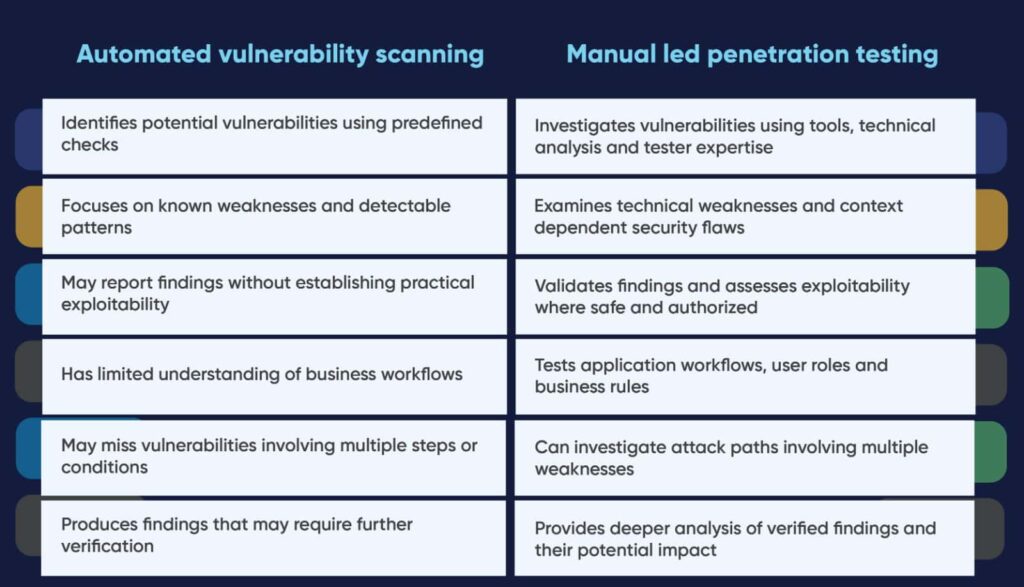
Automated penetration testing solutions can perform certain exploit checks and predefined attack sequences. However, their coverage depends on the capabilities of the tools, their configuration and the environment being tested.
For this reason, organizations should understand exactly what a vendor means when describing an engagement as automated, manual or manual-led.
An Example: Why Manual Testing Matters
Consider a multi-tenant SaaS application used by several customers. Each customer has access to its own records, reports and configuration settings.
An automated scanner may identify an API endpoint that retrieves customer records and report that the endpoint is accessible to authenticated users.
A manual tester would investigate further:
- Can a user access records belonging to another customer?
- Can a standard user perform actions reserved for an administrator?
- Can changing an object identifier expose another customer’s information?
- Can a user modify records or trigger actions outside their authorized role?
- Can weaknesses across multiple endpoints be combined to gain additional access?
If the application correctly enforces authorization, the endpoint’s accessibility alone may not represent a vulnerability. If authorization checks are missing or incorrectly implemented, the tester may be able to demonstrate unauthorized access or modification.
This is an example of why understanding application context is essential. The security risk may depend on the relationship between the authenticated user, the requested resource and the action being performed, rather than on a known software signature.
Why Automated Scanning and Manual Testing Should Work Together
Automated scanning and manual testing serve different but complementary purposes.
Automation helps identify known weaknesses efficiently and provides repeatable checks across large environments. Manual testing investigates the findings, explores application-specific risks and examines security controls that require contextual understanding.
Relying only on manual testing can also be inefficient when automated tools could identify large numbers of common issues quickly. Conversely, relying only on automated scanning can leave important vulnerabilities undetected or insufficiently investigated.
A combined approach helps organizations achieve more meaningful security coverage.
The appropriate balance depends on several factors, including:
- Application complexity and technology stack
- Number of applications, APIs and infrastructure assets
- Sensitivity of the data being processed
- Complexity of business logic and user permissions
- Regulatory and contractual requirements
- Testing objectives, timelines and available access
There is no universal percentage of manual and automated effort that defines a complete VAPT. Vendors should instead explain their methodology, coverage, validation process and testing limitations.
What Should Organizations Ask Their VAPT Provider?
Before engaging a cybersecurity provider, organizations should clarify the following:
- s the proposed service an automated vulnerability scan or a penetration test?
- Are findings identified by automated tools manually validated?
- Does the scope include business logic, access control and privilege escalation testing?
- Are APIs and multi-tenant authorisation scenarios covered where relevant?
- Does the engagement include controlled exploitation and evidence of impact, subject to authorization and safety constraints?
- How are false positives handled, and how are findings prioritized?
- Are remediation recommendations and retesting included in the scope?
These questions help organizations understand what they are purchasing and whether the proposed assessment aligns with their security objectives.
Conclusion: Look Beyond the Scan Report
A VAPT engagement should provide more than a list of potential vulnerabilities. It should help an organization understand where its security controls may fail, whether identified weaknesses can be exploited, what the consequences could be and how the risks can be addressed.
Automated tools are an important part of modern security testing, but their findings need appropriate interpretation and validation. Manual testing adds the investigative depth required to assess application specific vulnerabilities, business logic weaknesses and complex attack scenarios.
The objective is not simply to identify more vulnerabilities. It is to understand the real security risks and provide actionable insights to reduce them.
At CyRAACS, our cybersecurity assessment approach combines automated security testing with expert-led analysis, tailored to the agreed scope and testing objectives. This helps organizations gain a clearer understanding of their security exposure and make informed decisions about remediation and risk reduction.
To discuss your VAPT requirements, application security testing or API security assessment, contact [email protected].